Running Gemma 4 12B Locally with Speculative Decoding
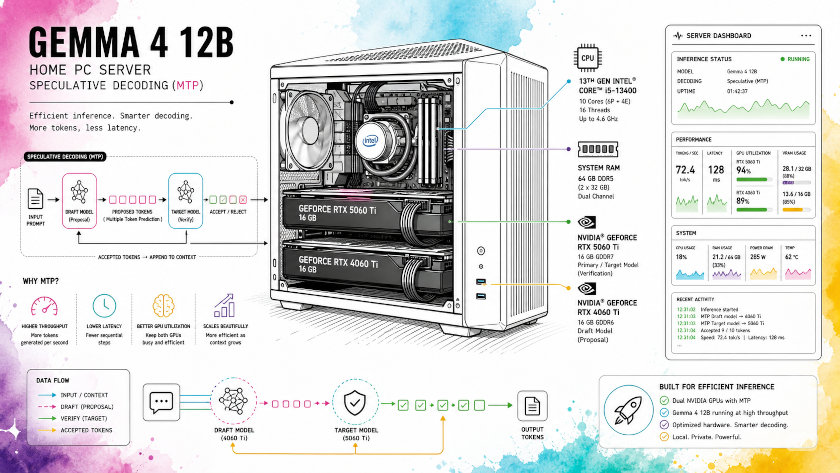
This guide shows how to run Gemma 4 12B locally on Ubuntu with llama.cpp, Hugging Face automatic model loading, and speculative decoding using Gemma 4’s MTP path.
The test system used two NVIDIA GPUs, an i5-13400, and 64 GB of RAM.
With llama-server at 256k context, Gemma 4 12B ran at about 50 tok/s and peaked at 63.47 tok/s on short replies.
What worked
The Q8_K_XL build loaded successfully and served requests through the Hugging Face auto-download path. The BF16 path was removed after repeated assistant/MTP loading failures in this environment.
The final stable mode used:
-hf unsloth/gemma-4-12b-it-GGUF:UD-Q8_K_XL--spec-type draft-mtp--spec-draft-n-max 4
Launch script
This is the working launch pattern:
#!/usr/bin/env bash
set -euo pipefail

SCRIPT_DIR="$(cd "$(dirname "${BASH_SOURCE[0]}")" && pwd)"
LLAMA_DIR="${LLAMA_DIR:-$HOME/llama.cpp}"

if [[ -d "$SCRIPT_DIR/llama.cpp/build" ]]; then
  LLAMA_DIR="$SCRIPT_DIR/llama.cpp"
elif [[ -d "$SCRIPT_DIR/build" && -x "$SCRIPT_DIR/build/bin/llama-server" ]]; then
  LLAMA_DIR="$SCRIPT_DIR"
fi

TEMP="${TEMP:-0.8}"
TOP_P="${TOP_P:-0.9}"
TOP_K="${TOP_K:-40}"
DRAFT_N_MAX="${DRAFT_N_MAX:-4}"
HOST="${HOST:-127.0.0.1}"
CTX_SIZE="${CTX_SIZE:-}"
PORT="${PORT:-}"

choose_context() {
  echo "Select context size (default: 48k):"
  echo " 1) 48k (49152)"
  echo " 2) 64k (65536)"
  echo " 3) 128k (131072)"
  echo " 4) 256k (262144)"
  read -r -p "Enter choice [1-4] (default 1): " choice
  case "${choice:-1}" in
    1) CTX_SIZE=49152; PORT="${PORT:-8048}"; LABEL="48k" ;;
    2) CTX_SIZE=65536; PORT="${PORT:-8064}"; LABEL="64k" ;;
    3) CTX_SIZE=131072; PORT="${PORT:-8128}"; LABEL="128k" ;;
    4) CTX_SIZE=262144; PORT="${PORT:-8256}"; LABEL="256k" ;;
    *) echo "Invalid choice: ${choice}"; exit 1 ;;
  esac
}

choose_context

SERVER_BIN="$LLAMA_DIR/build/bin/llama-server"

if [[ ! -x "$SERVER_BIN" ]]; then
  echo "Error: llama-server not found or not executable: $SERVER_BIN" >&2
  exit 1
fi

echo "Starting Gemma 4 12B"
echo " LLAMA_DIR = ${LLAMA_DIR}"
echo " MODEL_LABEL = Q8_K_XL"
echo " MODEL_SPEC = -hf unsloth/gemma-4-12b-it-GGUF:UD-Q8_K_XL"
echo " CONTEXT = ${LABEL} (${CTX_SIZE})"
echo " HOST = ${HOST}"
echo " PORT = ${PORT}"
echo " TEMP = ${TEMP}"
echo " TOP_P = ${TOP_P}"
echo " TOP_K = ${TOP_K}"
echo " DRAFT_N_MAX = ${DRAFT_N_MAX}"
echo

printf 'COMMAND:'
printf ' %q' "$SERVER_BIN" -hf unsloth/gemma-4-12b-it-GGUF:UD-Q8_K_XL --ctx-size "$CTX_SIZE" --temp "$TEMP" --top-p "$TOP_P" --top-k "$TOP_K" --host "$HOST" --port "$PORT" --spec-type draft-mtp --spec-draft-n-max "$DRAFT_N_MAX" --cache-ram 24576
printf '

'

exec "$SERVER_BIN"   -hf unsloth/gemma-4-12b-it-GGUF:UD-Q8_K_XL   --ctx-size "$CTX_SIZE"   --temp "$TEMP"   --top-p "$TOP_P"   --top-k "$TOP_K"   --host "$HOST"   --port "$PORT"   --spec-type draft-mtp   --spec-draft-n-max "$DRAFT_N_MAX" --cache-ram 24576
The server should expose the OpenAI-compatible endpoint on the chosen port, which in my case was 8256 for the 256k context run.
Verify with curl
A simple test request looks like this:
curl -s http://127.0.0.1:8256/v1/chat/completions   -H "Content-Type: application/json"   -d '{
    "model": "gemma4",
    "messages": [
      {"role": "user", "content": "Write one line about the sky."}
    ],
    "stream": false
  }' | jq -r '.choices[0].message.content'
My server returned a clean completion and confirmed the endpoint was working.
Benchmark table
The repeated test runs on the 256k configuration showed stable prompt processing, generation speed around 48 to 55 tokens per second, and draft acceptance generally a little above 50 percent. The table below summarizes the clearest timing snapshots from the server logs and the 10-run curl loop.
| Metric | Observed value | Notes |
|---|---|---|
| Prompt speed | 92.71 tok/s to 118.41 tok/s | Short prompts were processed quickly across runs. |
| Generation speed | 47.67 tok/s to 54.65 tok/s | Most steady-state decoding runs clustered near 50 tok/s. |
| Total latency | 4.76 s to 6.23 s | Measured by the external curl loop for the one-line sky prompt. |
| Typical latency | About 5.6 s | The 10-run loop centered around the mid-5-second range. |
| Draft acceptance | 0.51 to 0.62 | Acceptance was consistently high enough to make MTP useful. |
| Best observed single response | 63.47 tok/s generation | Seen on the short hello verification request. |
A few representative server-side timing samples from the same setup are shown below.
| Task sample | Prompt tok/s | Eval tok/s | Total time | Draft acceptance |
|---|---|---|---|---|
| Short hello verification | 92.71 | 63.47 | 1.65 s | 0.75000 |
| Task 128 | 113.10 | 52.29 | 6.03 s | 0.58065 |
| Task 225 | 117.86 | 48.38 | 5.61 s | 0.51724 |
| Task 316 | 116.49 | 49.61 | 5.84 s | 0.54167 |
| Task 601 | 114.64 | 52.01 | 5.08 s | 0.56329 |
| Task 684 | 116.83 | 54.65 | 5.46 s | 0.61607 |
| Task 772 | 118.41 | 52.05 | 5.15 s | 0.56250 |
| Task 856 | 117.47 | 51.30 | 5.56 s | 0.55814 |
| Task 946 | 117.33 | 48.59 | 4.68 s | 0.51027 |
These measurements show a practical pattern: the system is not just able to load Gemma 4 12B at 256k context, but also to keep generation speed around 50 tok/s for real chat-style requests.
That is fast enough for interactive coding, debugging, and long-context assistance on a home workstation.
Real coding-task performance
On real coding-style prompts that filled tens of thousands of tokens in the 256k window, prompt ingestion stayed above 2,200 tokens per second and generation averaged around 20 tok/s, with draft acceptance usually between about 0.56 and 0.65.
In practice, that was enough to handle 15k–20k-token coding sessions (multi-file context, refactoring suggestions, and step-by-step debugging) without the model feeling sluggish, even when producing several hundred tokens of answer per request.
Why Q8_K_XL was the winner
In my environment, Q8_K_XL loaded successfully with speculative decoding, while BF16 repeatedly triggered Gemma 4 assistant/context errors. The upstream reports around Gemma 4 assistant support match that failure pattern, so removing BF16 was the right simplification.
Practical notes
Hugging Face auto-loading kept the workflow simple because it avoided a separate /home/berdachuk/llama.cpp/models/ directory. The model was loaded directly from the Hugging Face cache and the server used the cached GGUF snapshot automatically.
The main runtime sign that MTP was active was the draft_n_accepted field in the response timings, which confirmed speculative decoding was contributing to token generation.
Takeaway
For this setup, the stable answer was simple: use Gemma 4 12B Q8_K_XL with HF auto-download and MTP, verify with curl, and benchmark with a small loop. That gave you a working local server and measurable speculative decoding gains without maintaining a separate model directory.
Conclusion
In practice, this setup shows that Gemma 4 12B is fast enough to feel responsive while still supporting a very large context window. The 256k context run worked correctly in my environment, which makes the model useful for long conversations, multi-file coding questions, and tasks that need a lot of retained context.
Speculative decoding makes the biggest difference when you want the model to stay interactive for practical work such as coding help, script generation, debugging, and iterative prompt refinement. For home use, that combination of speed and context is the main reason this setup is worth keeping around.
Published on 6/10/2026