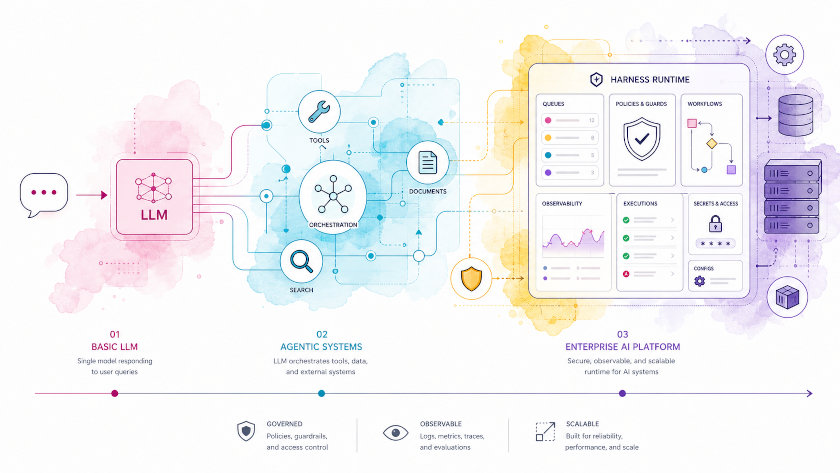
From Chatbots to Harnesses: How Modern AI Systems Really Differ
People constantly mix up “chatbots”, “agents”, “RAG”, and “harnesses”.
A Telegram bot with tools is called an agent, a single-prompt RAG is sold as “Deep Research”, and anything with a queue becomes “AGI workflows”.
Under the hood, these systems look very different.
Why This Matters (in Two Concrete Examples)
Example A — The Travel Assistant. You ask ChatGPT: "Book me a flight to Berlin next Tuesday, a hotel near the conference center, and put everything in my calendar." It gives you a list of suggestions. You copy-paste them into three different websites, manually check prices, and type the dates into your calendar yourself. The AI answered. It didn't do anything.
Example B — The Coding Assistant. You ask an AI in your IDE: "Find the bug in the payment module, fix it, write a test, and push the change." A plain chatbot says "here's what might be wrong." A real agent opens the file, reads the code, runs the failing test, edits the function, re-runs the test, commits, and pushes. The AI acted.
The difference between Example A and Example B is not "a better model." It's the system around the model — the scaffolding that gives it memory, tools, rules, and a loop to try, check, and retry. That scaffolding is what this article is about.
This article is a practical classification of AI systems along one axis: how much control and state lives outside the model vs. inside it. We’ll go from the simplest chat UI to full-blown harness engineering, with inline Mermaid diagrams and architecture patterns engineers can actually implement in production.
The Core Axis: From Stateless LLM to Agent + Harness
Quick definitions (we'll unpack each one as we go):
- Model — the pattern-matching brain that predicts the next word. GPT-4, Claude, Gemini, a local Llama — same category.
- Agent — a model plus a runtime that can take actions toward a goal. It thinks, picks a tool, acts, observes the result, and decides what to do next.
- Harness — the operating system around agents: queues, sandboxes, safety rules, logs, and human approval gates. The harness doesn't make the agent smarter; it makes it safe and reliable enough to ship.
At a high level, most production systems today fall somewhere along this ladder:
- Chat with LLM
- LLM with tools (router)
- RAG (retrieval-augmented generation)
- Deep Research systems
- Agent (planner + tools + memory)
- Harness (agent runtime with safety, observability, and SLAs)
The main differences are not “how big is the model?” but:
- Where does control logic live — in the prompt or in code?
- What controls memory — a rigid pipeline or dynamic planning?
- How is the task lifecycle structured — a single request/response or a full loop with retries, SLAs, and human-in-the-loop?
Here is the whole ladder in one diagram.
View Mermaid source code
flowchart BT
    A["Level 1:<br/>Chat with LLM"]:::basic --> B["Level 2:<br/>LLM + Tools (Router)"]:::tool
    B --> C["Level 3:<br/>RAG Pipeline"]:::rag
    C --> D["Level 4:<br/>Deep Research System"]:::research
    D --> E["Level 5:<br/>Agent<br/>(Planner + Tools + Memory)"]:::agent
    E --> F["Level 6:<br/>Harness<br/>(Runtime, Safety, SLAs)"]:::harness

    MCP["MCP<br/>(Model Context Protocol)<br/>Standardized tool/resource<br/>transport — Levels 2, 4, 5, 6"]:::mcp
    A2A["A2A<br/>(Agent-to-Agent)<br/>Standardized inter-agent<br/>protocol — Levels 4, 5, 6"]:::a2a
    GUARDS["Guards<br/>(Input/Output Guardrails)<br/>Model I/O safety net —<br/>all levels 1–6"]:::guards

    A -.-> GUARDS
    B -.-> GUARDS
    C -.-> GUARDS
    D -.-> GUARDS
    E -.-> GUARDS
    F -.-> GUARDS

    B -.-> MCP
    D -.-> MCP
    E -.-> MCP
    F -.-> MCP

    D -.-> A2A
    E -.-> A2A
    F -.-> A2A

    classDef basic fill:#e3f2fd,stroke:#1565c0,stroke-width:1px;
    classDef tool fill:#e8f5e9,stroke:#2e7d32,stroke-width:1px;
    classDef rag fill:#fff3e0,stroke:#ef6c00,stroke-width:1px;
    classDef research fill:#ede7f6,stroke:#5e35b1,stroke-width:1px;
    classDef agent fill:#fce4ec,stroke:#ad1457,stroke-width:1px;
    classDef harness fill:#efebe9,stroke:#4e342e,stroke-width:1px;
    classDef mcp fill:#fffde7,stroke:#f9a825,stroke-width:1px,stroke-dasharray: 4 3;
    classDef a2a fill:#e8eaf6,stroke:#3949ab,stroke-width:1px,stroke-dasharray: 4 3;
    classDef guards fill:#ffebee,stroke:#c62828,stroke-width:1px,stroke-dasharray: 4 3;
How to read the ladder:
- Each level contains everything below it and adds one new capability on top.
- Level 1 → 2 adds a Tool Registry and a single tool-or-no-tool decision. The model can now reach the outside world, but only once per request.
- Level 2 → 3 adds a fixed retrieval pipeline. The model's prompts are now grounded in your data, but the plan is still hard-coded in code.
- Level 3 → 4 swaps the static pipeline for an explicit Planner + iterative loop + working memory. The model now decides what to search and when to stop.
- Level 4 → 5 generalizes the research loop into a real agent: a runtime that thinks, acts, observes, and reflects across any tool — not just search.
- Level 5 → 6 wraps the agent in a harness: queues, policies, sandboxes, validators, observability, and humans-in-the-loop. The agent is now a worker; the harness is the OS.
- MCP (the gold dashed node) is a cross-cutting standard for tool/data integration. It standardizes how tools, resources, and prompts are exposed and discovered — and it slots into Levels 2, 4, 5, and 6. Full deep-dive in the Cross-Cutting Concerns chapter at the end.
- A2A (the blue dashed node) is a cross-cutting standard for agent-to-agent collaboration. It standardizes how agents discover, delegate to, and exchange results with other agents — and it slots into Levels 4, 5, and 6. Full deep-dive in the Cross-Cutting Concerns chapter at the end.
- Guards (the red dashed node) is a cross-cutting safety layer that wraps every model I/O. It catches jailbreaks, PII, hallucinations, and destructive actions at the boundary — and it touches all six levels. Full deep-dive in the Cross-Cutting Concerns chapter at the end.
- MCP, A2A, and Guards are complementary: MCP moves the data, A2A moves the work, Guards make sure neither moves garbage. A production system at Level 4+ should have all three.
A useful mental model: as you climb the ladder, more of the control logic moves from code into the model, and more of the lifecycle moves out of the request and into a runtime that surrounds it.
We’ll now go through each level with architecture diagrams and when you should actually use it.
Level 1 — Chat with LLM: Thin Wrapper, Almost No State
This is the simplest pattern: a UI that forwards messages to an LLM and shows the response. System prompt governs behavior, and the only “memory” is chat history.
Architecture: Single State Machine with Session Context
At this level, the back end is usually just:
- A ChatController: HTTP/WebSocket endpoint.
- A Session Store: Redis/PostgreSQL with messages.
- A Prompt Builder: system prompt + history + user message.
- An LLM Client: talks to OpenAI / local model / etc.
View Mermaid source code
flowchart TD
    User(["User"]) -->|"send message"| UI["Chat UI<br/>(Web / Mobile / CLI)"]
    UI -->|"POST /chat { session_id, message }"| BE["Backend Service"]

    subgraph BE_NODE [" "]
        direction TB
        SESSION["Session Store<br/>(history per session)"]
        PROMPT["Prompt Builder"]
        LLM["LLM Client<br/>(OpenAI / Local)"]
    end

    BE -.- SESSION
    BE -.- PROMPT
    BE -.- LLM

    SESSION -->|"load history(session_id)"| BE
    BE -->|"build(system + history + user)"| PROMPT
    PROMPT -->|"completion(prompt)"| LLM
    LLM -->|"response"| BE
    BE -->|"append to history"| SESSION
    BE -->|"response"| UI

    note1["No tools<br/>No explicit planning<br/>All behavior lives<br/>in system prompt"]
    LLM -.-> note1
Flow, step by step:
- User sends a message — typed text, voice transcript, or any other input reaches the
Chat UI(web, mobile, or CLI). - UI posts to the backend —
POST /chat { session_id, message }is the only entry point. No streaming, no events, just a request. - Backend loads prior history — the
Session Storereturns the previous messages for thatsession_id(typically from Redis or amessagestable in PostgreSQL). - Prompt Builder assembles the prompt — it concatenates
system prompt + history + new user messageinto a single string. There is no dynamic planning here. - LLM Client calls the model — the assembled prompt goes to OpenAI / a local model / whatever provider. The model produces a completion.
- Backend stores the response — the assistant turn is appended to the
Session Storeso the next turn can include it as history. - Backend returns the response — the same string is sent back over HTTP to the
Chat UI, which renders it.
Key invariant: every request is one round trip — request → completion → response. There are no tool calls, no branching, no self-evaluation. The whole "intelligence" lives in the system prompt; the backend is a stateless relay that happens to keep a history.
When Level 1 Is Enough
- Support chat with scripted flows.
- Simple “ChatGPT-like” interface over a generic model.
- Prototypes where you only test prompting, not orchestration.
As soon as you want to interact with APIs, call tools, or do anything multi-step, you move up.
In short: Level 1 is a smart typewriter. It can answer anything, but it can't do anything. The moment you need the AI to reach outside its own text box, you need Level 2.
Note on cross-cutting concerns: three important standards and safety layers — MCP (tool/data integration), A2A (agent-to-agent delegation), and Guards (input/output guardrails) — cut across the levels we’re about to walk through. We’ll see them in action at each level, and cover them in depth in the Cross-Cutting Concerns section at the end of the article. Keep them in the back of your mind as you read; don’t worry if the names don’t mean much yet.
Level 2 — LLM + Tools: Single-Step Routing
This is still “chat”, but the model can call tools: weather, search, DB queries, internal APIs. Orchestrator is simple: one decision, one tool call, back to user.
In most frameworks, this is “tool/function calling”.
Architecture: Router with Tool Registry
Components:
- Tool Registry: list of available tools (name, description, schema).
- Router: asks LLM which tool to call, executes it, stitches result back.
- Session Store: same as Level 1.
View Mermaid source code
flowchart TD
    User(["User"]) -->|"message"| UI["Chat UI"]
    UI -->|"/chat"| BE["Backend"]

    subgraph BE_NODE [" "]
        direction TB
        SESSION["Session Store"]
        TOOLS["Tool Registry"]
        ROUTER["LLM Router"]
        INVOKER["Tool Invoker"]
    end

    BE -.- SESSION
    BE -.- TOOLS
    BE -.- ROUTER
    BE -.- INVOKER

    SESSION -->|"load history"| BE
    BE -->|"decide(message, history)"| ROUTER
    ROUTER -->|"list(tool_specs)"| TOOLS
    ROUTER -->|"call LLM(tool_specs,<br/>should_call_tool?)"| ROUTER
    ROUTER -->|"invoke(tool_name, args)"| INVOKER
    INVOKER -->|"tool_result"| ROUTER
    ROUTER -->|"final_answer"| BE
    BE -->|"update history"| SESSION
    BE -->|"answer"| UI

    note1["Single decision per request:<br/>- No multi-step planning<br/>- No explicit loops<br/>- LLM chooses 0 or 1 tool"]
    ROUTER -.-> note1
Flow, step by step:
- User sends a message — the
Chat UIposts it toPOST /chaton the backend. - Backend loads history — same as Level 1, the
Session Storereturns prior messages for the session. - Router asks the LLM whether to call a tool — the
LLM Routersends the message + history + a list oftool_specs(name, description, JSON schema) and asks: should I call a tool, or just answer? - Two branches emerge from that single decision:
- No tool needed → the Router returns a direct answer. Step 7.
- Tool needed → the Router picks a tool name + arguments, the
Tool Invokerexecutes it (HTTP call, DB query, internal API), and thetool_resultis fed back to the Router.
- Router stitches the result — if a tool ran, the Router calls the LLM a second time with the tool_result in context and produces a
final_answer. - Backend persists and replies — the assistant turn is appended to history and returned to the UI.
- UI renders the answer — the user sees a single response (regardless of whether a tool was used internally).
Key invariant: the model makes exactly one tool-or-no-tool decision per request. There is no loop, no "did the tool succeed, do I need another tool?" check. If a real multi-step workflow is needed, you have to move to Level 5 (Agent).
When Level 2 Is Enough
- “Smart” chatbots: FAQ + small actions (create ticket, fetch status).
- Voice assistants and smart speakers.
- Telegram/Slack bots with a few commands behind the scenes.
If you need domain knowledge and internal docs, you inevitably add RAG.
In short: Level 2 gives the model one "hand" — it can reach out and grab one thing per request. But it can't plan a sequence of actions, and it can't learn from what it just did. For that, you need to climb higher.
Level 3 — RAG: Fixed Pipeline Over a Knowledge Base
RAG systems answer using your own data: PDFs, Confluence, code, tickets.
Architecturally, this is a fixed pipeline: retrieve → postprocess → generate.
The key point: there is almost no agentic behavior. The plan is baked into your code, not generated dynamically by the model.
Architecture: Retrieval Pipeline, Not an Agent
View Mermaid source code
flowchart TD
    User(["User"]) -->|"question"| UI["Client"]
    UI -->|"/ask { query }"| RAG["RAG Backend"]

    subgraph RAG_NODE [" "]
        direction TB
        QP["Query Preprocessor"]
        RET["Retriever<br/>(Vector / Hybrid)"]
        RERANK["Reranker / Filter"]
        PB["Prompt Builder"]
        LLM["LLM<br/>(Reader)"]
    end

    RAG -.- QP
    RAG -.- RET
    RAG -.- RERANK
    RAG -.- PB
    RAG -.- LLM

    KB[("KB Index<br/>(Vector DB / Search Engine)")]
    RAG -.- KB

    RAG -->|"normalize/query rewrite"| QP
    QP -->|"search(query')"| RET
    RET -->|"retrieve"| KB
    KB -->|"top-K chunks"| RET
    RET -->|"rerank/filter"| RERANK
    RERANK -->|"build(system + context + query)"| PB
    PB -->|"generate"| LLM
    LLM -->|"answer + citations"| RAG
    RAG -->|"answer"| UI

    note1["Control flow lives in code:<br/>- Typically 1–2 retrieval rounds<br/>- No dynamic planning<br/>- No self-evaluation loop"]
    RAG -.-> note1
Flow, step by step:
- User asks a question — the
ClientcallsPOST /ask { query }on theRAG Backend. - Query Preprocessor rewrites the query — normalization, spell-fix, expansion, sometimes a HyDE-style "what would the answer look like?" rewrite. The output is a cleaner
query'. - Retriever searches the index —
search(query')hits a vector store (FAISS, pgvector, Qdrant) and/or a lexical index (BM25). The KB returns the top-K raw chunks. - Reranker / Filter narrows the result set — a cross-encoder or heuristic filter drops irrelevant or duplicated chunks; the survivors are the actual context.
- Prompt Builder assembles the final prompt —
system + retrieved_context + user_queryis concatenated. There is no dynamic plan — the retrieval happened because the code said so, not because the model asked for it. - LLM (Reader) generates the answer — the same model is used as in Level 1/2, but it is fed the retrieved context. It returns
answer + citationspointing back to the source chunks. - Backend returns the answer — the
RAG Backendships the answer (and citations) to theClient.
Key invariant: retrieval is baked into the request path. The model never decides whether to retrieve or what to retrieve next — that plan is hard-coded. Fancy multi-vector indices, cross-encoder rerankers, and graph-RAG still fall here: the loop is fixed in code, the model just reads what the pipeline hands it.
When Level 3 Is Enough
- FAQ bots over docs.
- Dev portals and internal knowledge search.
- Onboarding / policy / SOP assistants.
Even “fancy RAG” (multi-vector, cross-encoder rerankers, graph indices) is often still a pipeline, not an agent: control is static, baked into the service.
In short: Level 3 grounds the model in your data, but the model never decides what to retrieve or when to stop. The pipeline is a fixed recipe — the model just reads what it's handed. To let the model drive the search itself, you need Level 4.
Level 4 — Deep Research: Multi-Step Search + Working Memory
Deep Research is where the system actively explores the world (web, APIs, indices) in several steps, with planning and checking completeness.
Compared to RAG:
- RAG: “given this KB, answer this question”.
- Deep Research: “figure out what to ask, where to search, what to read, and when to stop”.
Architecture: Planner + Research Loop
Most Deep Research systems introduce:
- A Planner: breaks a query into sub-questions.
- A Research Loop: iteratively runs search + reading.
- A Working Memory: stores links, notes, partial summaries.
- A Synthesizer/Reviewer: merges everything and checks coverage.
View Mermaid source code
flowchart TD
    User(["User"]) -->|"research request"| UI["Client"]
    UI -->|"/research { query }"| ORCH["Deep Research Orchestrator"]

    subgraph ORCH_NODE [" "]
        direction TB
        PLANNER["Planner<br/>(LLM)"]
        RESEARCHER["Researcher<br/>(LLM + Search Tool)"]
        WM["Working Memory<br/>(Notes, Links, Snippets)"]
        SYN["Synthesizer / Reviewer<br/>(LLM)"]
    end

    ORCH -.- PLANNER
    ORCH -.- RESEARCHER
    ORCH -.- WM
    ORCH -.- SYN

    SOURCES[("Web / APIs / RAG KB")]
    ORCH -.- SOURCES

    ORCH -->|"plan(query)"| PLANNER
    PLANNER -->|"list of sub-questions"| ORCH

    ORCH -->|"research(sub-q)"| RESEARCHER
    RESEARCHER -->|"search / browse"| SOURCES
    SOURCES -->|"pages/snippets"| RESEARCHER
    RESEARCHER -->|"write notes, cite sources"| WM

    ORCH -->|"synthesize(WM, query)"| SYN
    SYN -->|"draft report"| ORCH
    ORCH -->|"validate coverage / gaps?"| SYN
    SYN -->|"final report + caveats"| ORCH
    ORCH -->|"report"| UI

    note1["Key differences from RAG:<br/>- Explicit plan (list of sub-questions)<br/>- Iterative search/read/write loop<br/>- Working memory store<br/>- Final self-check for completeness"]
    ORCH -.-> note1
Flow, step by step:
- User submits a research request — the
ClientcallsPOST /research { query }on theDeep Research Orchestrator. - Planner decomposes the query — the LLM-powered
Plannerreturns a list of sub-questions ("What is X?", "Compare X and Y in region Z", "Find recent benchmarks…") that together cover the original goal. - Research loop runs per sub-question — for each sub-question:
- The
Researcherissues searches and browses pages against externalSOURCES(web, APIs, RAG KBs). - It pulls pages and snippets, then writes structured notes (with citations) into the
Working Memory. - It moves to the next sub-question.
- The
- Synthesizer produces a draft report — the
Synthesizer / Reviewerreads everything inWorking Memoryand drafts a coherent report. - Self-check for coverage — the Orchestrator (or the Reviewer) re-reads the draft against the original plan and asks: what's missing, what contradicts what? If there are gaps, it goes back to step 3 with new sub-questions.
- Final report is returned — once the review passes, the
SYNemits the final report + caveats, and theORCHreturns it to theClient.
Key invariants vs. RAG:
- There is an explicit plan (the sub-questions) generated by an LLM, not a fixed pipeline.
- The search → read → write cycle runs N times, dynamically, until coverage is acceptable.
- The model maintains a
Working Memoryacross iterations — partial summaries, links, snippets. - There is a terminal self-check that can trigger more research or stop the loop.
When Level 4 Is the Right Tool
- Competitive / market research.
- Technical literature review.
- Multi-document, cross-source synthesis (e.g., “compare three new EU AI regulations and summarize differences”).
Deep Research is a domain-specific agent focused on search and reading.
To generalize beyond “research tasks”, you need a full agent.
In short: Level 4 is the first level where the model plans and decides when to stop. But it's still a specialist — it only knows how to search and read. To let it use any tool and change the world, you need Level 5.
Level 5 — Agent: Planner + Tools + Memory + Reflection
An agent is a loop: the system sets subgoals, chooses tools, executes, evaluates, and updates the plan.
Key properties:
- Non-deterministic flow (same task can trigger different sequences).
- Control logic is partly in the model (plans, decisions), partly in the runtime.
- Memory is first-class: short-term, long-term, sometimes graph-based.
Architecture: Agent Runtime with Thought → Act → Observe Loop
A minimal single-agent architecture usually has:
- Agent Runtime: state machine / event loop.
- Planner/Thinker (LLM).
- Tool Executor.
- Memory Layer: short + long term.
- Evaluator/Reflector (LLM).
View Mermaid source code
flowchart TD
    User(["User"]) -->|"task"| UI["Client"]
    UI -->|"/agent/start { goal }"| AR["Agent Runtime"]

    subgraph AR_NODE [" "]
        direction TB
        SM["Agent State Machine"]
        PL["Planner / Reasoner<br/>(LLM)"]
        TE["Tool Executor"]
        EV["Evaluator / Reflector<br/>(LLM)"]
        MEM["Memory Layer<br/>(short-term + long-term)"]
    end

    AR -.- SM
    AR -.- PL
    AR -.- TE
    AR -.- EV
    AR -.- MEM

    TOOLS["Tools / Skills<br/>(APIs, Files, RAG, etc.)"]
    AR -.- TOOLS

    AR -->|"init episode"| MEM
    SM -->|"THINK(state, goal, history)"| PL
    PL -->|"plan / next_action"| SM

    SM -->|"call(tool_name, args)"| TE
    TE -->|"execute"| TOOLS
    TOOLS -->|"result"| TE
    TE -->|"write(observation)"| MEM

    SM -->|"evaluate(progress, mem)"| EV
    EV -->|"updated plan / termination"| SM

    SM -->|"THINK(next_state)"| PL

    SM -->|"finalize episode"| MEM
    AR -->|"final_result"| UI

    note1["Agent properties:<br/>- Internal loop, not 1-shot<br/>- Tools are chosen dynamically<br/>- Memory is explicit<br/>- Evaluation can trigger replanning"]
    AR -.-> note1
Flow, step by step:
- User submits a task (goal) — the
ClientcallsPOST /agent/start { goal }on theAgent Runtime. The runtime initializes a new episode in theMemory Layer. - State machine asks the Planner to THINK — given
(state, goal, history), the LLM-poweredPlannerproduces aplan / next_action. - The agent picks one of two paths per step:
- Act via a tool — the
Tool Executorcalls the chosen tool (API, file system, RAG, etc.), the result is written toMemoryas anobservation. - Reflect / replan — the
Evaluator / Reflectorreviews progress and memory, then returns an updated plan or a termination signal.
- Act via a tool — the
- State machine re-enters THINK — with the new state, history, and memory, the
Plannerdecides the next action. - Loop until done / max_steps — steps 3–4 repeat. Each cycle can choose a different tool, hit an error, replan, or stop.
- Finalize the episode — when the agent terminates, the
Memory Layerflushes any pending writes, and theAgent Runtimereturns thefinal_resultto theClient.
Key invariants:
- The agent runs an internal loop, not a single request/response.
- Tools are chosen dynamically by the LLM, not by a fixed pipeline.
- Memory is explicit — short-term (current episode) and long-term (cross-session) stores are first-class components.
- Evaluation can trigger replanning — the same model that plans also critiques its own progress.
When You Actually Need an Agent
- Multi-step workflows with branching, e.g., “diagnose, then order tests, then summarize results”.
- Environments where the agent can change the world: code, infra, data pipelines, UI automation.
- Systems where intermediate artifacts matter: PRs, design docs, test suites.
In practice, many “agent frameworks” (LangGraph, CrewAI, AutoGen) implement some version of this loop and let you wire tools/memory around it.
In short: Level 5 is where the AI stops being a "smart answer machine" and becomes a worker. It can plan, act, observe, and replan — the same model that writes the plan also critiques it. But a single agent running loose is still a demo. To make it production-grade, you need Level 6.
Level 6 — Harness: The Runtime Around Agents
Harness is not “a smarter agent”. It’s the runtime around agents: queues, retries, safety policies, observability, artifact verification, and human-in-the-loop.
OpenAI calls this harness engineering: making agents reliable enough to build a real product where every line of code is agent-generated.
Architecture: Agent Harness as an AI OS
Typical components in a harness:
- Task Queue: jobs for agents.
- Execution Orchestrator: spins up agent runs, manages concurrency.
- Policy Engine: what tools are allowed, rate limits, guardrails.
- Sandbox: where agents can safely execute code, tests, migrations.
- Artifact Store + Validators: code, plans, reports and their checks.
- Telemetry / Observability: traces, metrics, logs.
- Humans-in-the-Loop: approval, escalation, overrides.
View Mermaid source code
flowchart TD
    HUMAN(["User"]) -->|"submit task"| QUEUE[("Task Queue")]
    TRIGGER(["External Trigger<br/>(CRON / Webhook)"]) -->|"enqueue task"| QUEUE
    QUEUE -->|"task pulled"| SCHED["Task Scheduler<br/>& Dispatcher"]

    subgraph HCP_NODE ["Harness Control Plane"]
        direction TB
        POLICY["Policy Engine<br/>(Guardrails, Limits)"]
        RUNNERS["Agent Runner Pool"]
        SANDBOX["Sandbox Manager<br/>(Env per run)"]
        ARTEFACTS["Artifact Store<br/>(Plans, Code, Reports)"]
        VALIDATORS["Validator / Checkers<br/>(Tests, Linters, Rules)"]
        OBS["Observability<br/>(Logs, Traces, Metrics)"]
        HITL["Human Review UI<br/>(HITL)"]
    end

    SCHED -->|"check(task)"| POLICY
    POLICY -->|"allowed? / deny"| SCHED
    SCHED -->|"allocate env"| SANDBOX
    SANDBOX -->|"start agent_run(env, task)"| RUNNERS

    AGENT["Agent Runtime(s)<br/>Agent Loop<br/>(Planner/Tools/Memory)"]
    HCP_NODE -.- AGENT

    RUNNERS -->|"run loop"| AGENT
    AGENT -->|"write artifacts"| ARTEFACTS
    AGENT -->|"request validation"| VALIDATORS
    VALIDATORS -->|"pass/fail, diagnostics"| AGENT
    AGENT -->|"final status"| RUNNERS
    RUNNERS -->|"teardown env"| SANDBOX

    RUNNERS -->|"logs, traces, metrics"| OBS

    AGENT -->|"ask for approval / decision"| HITL
    HITL -->|"approve / modify / cancel"| AGENT

    HCP_NODE -->|"status, results"| HUMAN

    note1["Harness responsibilities:<br/>- Break work into executable units<br/>- Manage lifecycle & context<br/>- Enforce validation & escalation<br/>- Make actions observable & auditable"]
    HCP_NODE -.-> note1
Flow, step by step:
- Task is enqueued — a
User(HUMAN) or anExternal Trigger(CRON, webhook) submits a task into theTask Queue. - Scheduler pulls the task — the
Task Scheduler & Dispatcherreads the next job. - Policy check — the
Policy Enginedecides whether the task is allowed (tool whitelist, rate limits, guardrails, budget). A denied task is bounced back to the Scheduler with a deny reason. - Sandbox allocation — the
Sandbox Managerspins up an isolated environment for this run (container, VM, branch) and hands it to theAgent Runner Pool. - Agent runs — the Runner starts an
Agent Runtimeinside the sandbox and lets it run its inner loop (Level 5). The agent:- Writes artifacts (code, plans, reports) to the
Artifact Store. - Asks
Validators(tests, linters, custom rules) to verify each artifact; feedback flows back into the loop. - May call the
Human Review UI(HITL) for approval, edits, or cancellation on sensitive steps.
- Writes artifacts (code, plans, reports) to the
- Telemetry is collected continuously — the Runners emit logs, traces, and metrics to
Observability. - Teardown — once the agent reports a final status, the Runner returns the artifacts, the Sandbox Manager tears down the environment, and the Scheduler marks the task done.
- Status flows back to the user — the Harness Control Plane surfaces results, links, and any human decisions to the original
User.
Key invariants:
- The harness enqueues, validates, and contains agent work — the agent itself is just a worker.
- The harness owns lifecycle, isolation, retries, SLAs, and observability — concerns that don't belong inside the agent.
- Humans-in-the-loop are a first-class component, not an afterthought — the agent can pause and ask.
- Artifacts are mechanically validated (tests, linters, custom rules) before being accepted.
Real-World Harness Lessons
From OpenAI’s harness experiment with Codex agents (1M LOC, 1,500 PRs, built in ~1/10th the normal time):
- The main work shifts from “writing code” to designing the environment: tools, invariants, feedback loops.
- Repository must be legible to agents: plans, docs, and logs are code and artifacts, not scattered across chats.
- Constraints and architecture become mechanically enforced, not aspirational.
- Harness is the difference between “cool demo” and a system that ships, breaks, self-heals, and keeps working.
In short: Level 6 is the operating system for agents. It doesn't make the agent smarter — it makes it safe, observable, and recoverable. If your agent touches real systems, money, or user data, you're already at Level 6 whether you built the harness or not. The only question is whether you built it on purpose.
Putting It All Together: Choosing the Right Level
Here’s a cheat sheet when architecting your next system.
View Mermaid source code
classDiagram
    class ChatLLM {
      +Minimal state
      +System prompt only
      +No tools
    }

    class ToolLLM {
      +Tool calling
      +Single-step routing
      +Session history
    }

    class RAG {
      +Retrieval pipeline
      +Fixed control flow
      +KB index
    }

    class DeepResearch {
      +Planner + sub-questions
      +Iterative search loop
      +Working memory
    }

    class Agent {
      +Plan/Act/Observe loop
      +Tools + memory
      +Self-evaluation
    }

    class Harness {
      +Queues, retries, SLAs
      +Policy & sandbox
      +Telemetry & HITL
    }

    ChatLLM <|-- ToolLLM
    ToolLLM <|-- RAG
    RAG <|-- DeepResearch
    DeepResearch <|-- Agent
    Agent <|-- Harness
- Start at Level 1–2 if you’re validating UX or prompts.
- Add Level 3 (RAG) when domain knowledge matters.
- Add Level 4 (Deep Research) when “just RAG” can’t handle multi-source, multi-step reasoning.
- Add Level 5 (Agent) when you need dynamic workflows, environment changes, or software/infra control.
- Invest in Level 6 (Harness) the moment agents are touching real systems, money, or safety-critical workflows.
The important thing: “agent” is not a badge you slap on a chatbot. It’s a distinct architecture: a loop with tools, memory, and evaluation.
And “harness” is not more prompt magic — it’s the OS for agents.
Cross-Cutting Concerns: MCP, A2A, and Guards
We’ve now climbed the full ladder from a stateless chat wrapper (Level 1) all the way up to a production-grade harness (Level 6). Before wrapping up, let’s revisit the three concerns we flagged at the top — MCP, A2A, and Guards — now that you have the architectural context to understand where they actually fit.
They are not new levels. They are standards and safety layers that cut across the levels, and they earn their place in any system that has moved past the toy stage. We’ll go through them in order: tools first (MCP), then agents (A2A), then safety (Guards), ending with a three-way comparison.
MCP — The Standard Plug for Tools and Resources
What MCP Is
MCP is an open standard (originally from Anthropic, now widely adopted) for how an LLM, agent, or harness talks to external tools and data sources. Concretely, it defines a JSON-RPC interface with three primitives:
- Tools — actions the model can invoke (search, query DB, run shell, call API).
- Resources — read-only data the model can fetch (files, tickets, docs, repo contents).
- Prompts — reusable, parameterized prompt templates that a server can hand to the client.
A server exposes those primitives; a client (an LLM app, an agent runtime, a harness) speaks MCP to discover and call them. The transport is typically stdio for local servers and HTTP+SSE for remote ones.
Where MCP Fits in the Ladder
MCP is not a new level — it's a transport and discovery standard that changes how tools plug into the levels above:
| Level | Without MCP | With MCP |
|---|---|---|
| Level 2 (Tools) | Each app hand-wires its own Tool Registry and Tool Invoker; tools are local code. | The Tool Registry is populated dynamically by an MCP client connecting to one or more MCP servers. Tools can live in a different process, language, or even a remote host. |
| Level 4 (Deep Research) | The Researcher calls a fixed set of search tools in-process. | The orchestrator can spin up new MCP servers at runtime — a "search" server, a "GitHub" server, a "PubMed" server — without redeploying the orchestrator. |
| Level 5 (Agent) | The Tool Executor is bound to whatever tool implementations the app ships with. | The agent discovers tools at startup (or even mid-run) from a registry of MCP servers. The same agent can run in IDE, terminal, or CI by pointing at different MCP server sets. |
| Level 6 (Harness) | Policy engine must inspect tool calls in the app's own format. | Policy engine can sit in front of an MCP gateway and apply uniform allow/deny, rate limits, and audit logging across every tool the agent touches. |
In short: MCP is the "USB-C" of the ladder — it doesn't add a new capability, it makes the existing tool-related capabilities composable across apps, vendors, and runtimes.
Minimal MCP Architecture
View Mermaid source code
flowchart TD
    HOST["Host App<br/>(LLM, Agent, Harness)"]
    CLIENT["MCP Client<br/>(inside Host)"]

    subgraph SERVERS ["MCP Servers (any language)"]
        S1["Server A<br/>tools: search, browse"]
        S2["Server B<br/>resources: files, git"]
        S3["Server C<br/>tools: db_query, sql"]
    end

    HOST -->|"spawn / connect"| CLIENT
    CLIENT -->|"initialize,<br/>listTools, listResources"| S1
    CLIENT -->|"initialize,<br/>listTools, listResources"| S2
    CLIENT -->|"initialize,<br/>listTools, listResources"| S3

    CLIENT -->|"callTool(name, args)"| S1
    CLIENT -->|"readResource(uri)"| S2
    CLIENT -->|"callTool(name, args)"| S3

    S1 -->|"tool_result"| CLIENT
    S2 -->|"resource contents"| CLIENT
    S3 -->|"tool_result"| CLIENT
Flow, step by step:
- Host starts an MCP client — typically as a sidecar process or in-process library, depending on the transport (stdio for local, HTTP+SSE for remote).
- Client initializes each server — handshake + capability exchange. The server declares its
tools,resources, andpromptsalong with their JSON schemas. - Host exposes the union to the model — the LLM sees a single, dynamic
Tool Registrybuilt from all connected servers. It doesn't know or care that some tools came from a Python server and others from a Node one. - Model picks a tool → client calls the server — the host's
Tool Invoker(or MCP gateway in a harness) routes the call to the right server, validates the args against the schema, and runs the tool. - Server returns the result — the client packages it back into the LLM's expected
tool_resultformat. The model is unaware that MCP happened. - Harness-level concerns stay outside the protocol — authn/authz, rate limits, audit logs, sandboxing are enforced by the host (or the harness) wrapping the MCP client, not by MCP itself.
What MCP Deliberately Does Not Solve
MCP is plumbing, not architecture. It does not:
- Decide when to call a tool (that's the model's job — Level 2/5).
- Loop or replan (that's the agent runtime — Level 5).
- Validate the result or enforce policy (that's the harness — Level 6).
- Add memory, planning, or retrieval semantics (Levels 4 and 5 again).
Treating MCP as "the agent" is a common mistake. It's a standardized adapter layer; the levels above are still responsible for control flow, state, and safety.
A2A — When One Agent Needs to Talk to Another
MCP standardizes how an agent reaches the outside world (tools, data, prompts). But what if the thing the agent needs to call is also an agent — with its own non-deterministic loop, its own memory, its own LLM? That's the problem A2A (Agent-to-Agent protocol) solves.
What A2A Is
A2A is an open standard (originally from Google, now in Linux Foundation) for agent-to-agent collaboration. Each agent exposes an Agent Card (a JSON manifest) describing its skills, input/output modes, and auth requirements. Other agents discover it, then send it Tasks over JSON-RPC over HTTP(SSE).
Core primitives:
- Agent Card — public manifest: agent identity, version, supported skills, modalities, auth schemes.
- Task — a stateful unit of work with a lifecycle (
submitted → working → input-required → completed | failed | canceled). - Message / Part — turns in a task: a list of
parts(text, file, structured data). - Artifact — produced output of a task (file, report, structured result).
- Streaming + Push Notifications — agents can stream incremental updates or push notifications for long-running tasks.
A2A is agent-to-agent, not tool-to-agent. The peer on the other end is a black-box agent with its own planner, memory, and tool set. You don't see its internals — you see its skill list and you hand it a task.
Where A2A Fits in the Ladder
Like MCP, A2A is not a new level — it's a protocol. But unlike MCP, it operates primarily at the higher levels where the actors are agents, not tools:
| Level | Without A2A | With A2A |
|---|---|---|
| Level 2 (Tools) | The router picks a tool from a hard-coded registry. | Not really applicable — A2A is overkill for synchronous tool calls; use MCP. |
| Level 4 (Deep Research) | The orchestrator does all the research in its own loop, in-process. | The orchestrator can delegate a whole sub-task to a remote research agent (e.g., "summarize EU AI regulations" → calls a remote ComplianceAgent via A2A) and wait for the artifact. |
| Level 5 (Agent) | The agent is a single process; multi-agent work is implemented in-process (CrewAI, AutoGen, LangGraph subgraphs). | The agent is a node in an agent graph: it can publish its own Agent Card and call other remote agents as if they were specialized skills. Each peer is itself a full Level 5 agent behind an A2A adapter. |
| Level 6 (Harness) | The harness dispatches to in-process agent runtimes. | The harness dispatches to a federation of agents across teams, vendors, and trust boundaries — with per-peer auth, SLAs, and policy. |
In short: MCP is for tools; A2A is for agents. Both are standards, both cut across the ladder — but they target different peers.
Minimal A2A Architecture
View Mermaid source code
flowchart TD
    USER(["User / Trigger"]) -->|"submit task"| HOST["Host Agent<br/>(Level 5)"]

    HOST -->|"local Tool Executor<br/>(Level 5 internals)"| TOOLS["Local Tools / MCP"]
    HOST -->|"messages.send /<br/>tasks.send"| A2A_CLIENT["A2A Client<br/>(inside Host)"]

    A2A_CLIENT -->|"GET /.well-known/<br/>agent.json"| REG["Agent Registry<br/>(Agent Cards)"]

    A2A_CLIENT -->|"tasks/send"| PEER_A["Peer Agent A<br/>(e.g., ResearchAgent)"]
    A2A_CLIENT -->|"tasks/send"| PEER_B["Peer Agent B<br/>(e.g., CodeAgent)"]
    A2A_CLIENT -->|"tasks/send"| PEER_C["Peer Agent C<br/>(e.g., ReviewerAgent)"]

    PEER_A -->|"SSE stream /<br/>push notifications"| A2A_CLIENT
    PEER_B -->|"SSE stream /<br/>push notifications"| A2A_CLIENT
    PEER_C -->|"SSE stream /<br/>push notifications"| A2A_CLIENT

    A2A_CLIENT -->|"task results, artifacts"| HOST
    HOST -->|"final_result"| USER
Flow, step by step:
- Host agent receives a task — from a user, a harness, or a cron. Its own Level 5 loop decides that part of the work should be delegated.
- Host discovers peers — it queries the Agent Registry (often
/.well-known/agent.jsonon each candidate host) to fetch Agent Cards. A card declares skills, modalities, auth, and SLA hints. - Host picks a peer and opens a task —
tasks/sendis the A2A equivalent of "start this work". The peer agent accepts (statesubmitted → working) and begins its own Level 5 loop internally. - Host continues locally in parallel — while the peer works, the host can keep planning, call local tools/MCP, or send more tasks to other peers. A2A tasks are async by default.
- Peer streams progress — incremental
Message/Artifactupdates come back over SSE; long tasks can also use push notifications. The host treats them as observations in its own memory and planner. - Peer returns a final artifact — task state goes to
completed(orfailed/input-requiredif it needs a human-in-the-loop decision). The artifact is added to the host's context. - Host synthesizes and replies — once all delegated tasks settle, the host produces the final answer for the user (or returns control to the harness).
Key invariants:
- Each peer is itself a Level 5 agent behind an A2A adapter — A2A hides whether the peer is one model call away or running a 6-hour research loop.
- Discovery is declarative (Agent Cards), not hard-coded — a new peer can be added without redeploying the host.
- Auth, modality, and SLA are first-class in the protocol — unlike an in-process tool call, A2A assumes a network boundary with trust.
- A2A is complementary to MCP, not a replacement. A host agent typically uses both: MCP for local tools and data, A2A for delegating to peer agents.
What A2A Deliberately Does Not Solve
A2A is an interchange format between agents, not an agent framework. It does not:
- Run the agent's internal loop (that's still Level 5).
- Decide how a peer agent reasons (that's the peer's concern).
- Provide shared memory across peers (each peer owns its own memory; A2A only exchanges messages/artifacts).
- Replace a harness — long-running A2A tasks still need a Level 6 harness for SLAs, retries, observability, and policy.
- Hide the cost of going over the network — A2A calls are slower, can fail, and have auth/tokens to manage.
Guards — The Safety Net Around Every Model I/O
MCP standardizes how an agent reaches tools. A2A standardizes how agents reach other agents. But both assume the content flowing through them is sane — that the user's prompt isn't a jailbreak, the model's output doesn't leak PII, and a tool's response hasn't been prompt-injected. Guards (a.k.a. guardrails) enforce that assumption.
What Guards Are
Guards are inline filters that sit at the I/O boundary of an LLM call — they intercept prompts, completions, tool arguments, and tool results, and either pass, rewrite, or block them. They are not a model; they are a layer the request flows through.
Two main flavors:
- Input guards — run on what goes into the model: user prompts, retrieved context, tool results, peer messages.
- Jailbreak / prompt-injection detection
- PII / secret detection and redaction
- Toxicity / topic classifiers
- Schema validation for tool arguments
- Length / cost / context-window caps
- Output guards — run on what comes out of the model: completions, tool-call requests, planned actions.
- Hallucination / grounding checks (does the answer match the retrieved context?)
- Code safety (does this shell command look destructive?)
- Action allow-listing ("this tool is not in the policy")
- Format / schema conformance
- Re-prompt or refuse if a check fails
A guard can be a regex, a classifier model, a deterministic validator, an LLM-as-judge, or any combination. The point is that it runs before the next stage trusts the content.
Where Guards Fit in the Ladder
Guards, like MCP and A2A, are not a new level — they're a safety layer that wraps model I/O at every level where the model is involved. The earlier you add them, the cheaper the failure modes:
| Level | Without Guards | With Guards |
|---|---|---|
| Level 1 (Chat) | Model output goes straight to the user. A hallucination is the user's problem. | Output guard screens the completion for PII, toxicity, off-topic, length, and refused answers before they reach the UI. |
| Level 2 (Tools) | The LLM decides which tool to call; the call goes through. A prompt-injected tool result can steer the next turn. | Input guard inspects tool results; output guard inspects the LLM's tool-call args against a schema and an allow-list before invocation. |
| Level 3 (RAG) | Whatever the retriever returns goes into the prompt. A poisoned chunk can hijack the answer. | Input guard filters retrieved chunks (dedup, relevance, injection patterns); output guard checks that cited chunks actually support the answer. |
| Level 4 (Deep Research) | The Planner can decide to scrape any URL; the LLM reads whatever it gets. | Input guard inspects scraped pages; output guard checks sub-question plans against allowed sources and rate limits. |
| Level 5 (Agent) | The agent's tool calls and code execution happen as planned. Destructive actions slip through. | Output guard inspects every tool call (especially shell, file write, network) before execution; input guard checks tool outputs for signs of compromise. |
| Level 6 (Harness) | The Policy Engine checks which tools are allowed; the guard checks whether the call is safe to make right now. | Both work in tandem — Policy = static allow/deny; Guard = dynamic, content-aware safety check. |
A useful mental model: Policy is the firewall rule; Guard is the IDS/IPS. Policy decides if a tool category is allowed. Guard decides if this specific call with this specific payload should run.
Minimal Guard Architecture
View Mermaid source code
flowchart TD
    USER(["User / Tool / Peer Agent"]) -->|"raw input"| IN["Input Guard<br/>(jailbreak, PII, schema, length)"]
    IN -->|"sanitized input"| LLM["LLM Call<br/>(plan / completion)"]
    LLM -->|"raw output"| OUT["Output Guard<br/>(schema, grounding, PII, action allow-list)"]

    OUT -->|"blocked / rewritten"| BLOCK[("Block / Rewrite / Refuse")]
    OUT -->|"approved output"| CALL["Tool Call / Final Answer"]

    CALL -->|"raw tool result"| TOOL_IN["Tool-Result Guard<br/>(injection, relevance, PII)"]
    TOOL_IN -->|"sanitized result"| LLM

    OBS["Observability<br/>(guard hit/miss,<br/>block reasons)"]
    IN -.->|"log"| OBS
    OUT -.->|"log"| OBS
    TOOL_IN -.->|"log"| OBS
Flow, step by step:
- Raw input arrives — user prompt, retrieved chunk, tool result, or A2A peer message. The
Input Guardruns first. - Input guard decides — pass (forward as-is), rewrite (e.g., mask a credit-card number), or block (e.g., detected a jailbreak attempt).
- LLM produces a draft — using the sanitized context. The
Output Guardruns on the raw completion and any tool-call arguments. - Output guard decides — pass (proceed to call), rewrite (e.g., reformat to schema), or block (e.g., detected a destructive
rm -rfshell command). A block triggers either refusal or a re-prompt. - Approved call runs — the tool executes; the result goes through a
Tool-Result Guardbefore being fed back to the LLM (closing the loop). - Every decision is logged to Observability — guard hit/miss, block reasons, rewrites. This is essential for tuning guard thresholds and for post-incident review.
Key invariants:
- Guards run on the data, not the model. They are usually faster and cheaper than the LLM itself, so they can be inline without hurting latency.
- Guards are deterministic where possible, learned where necessary. A regex catches "sk-" API keys; an LLM-as-judge is needed for "is this answer faithful to the retrieved context?"
- Guards must fail closed, not open. If a guard crashes or times out, the safe default is block, not pass.
- Guards are observable. Every block/rewrite is a structured event — without that, you can't tell the difference between a hardened system and a broken one.
- Guards don't replace Policy or the Harness — they're a layer in the I/O pipeline. The Harness still owns queues, retries, SLAs; the Policy still owns the static allow-list; the Guard owns the dynamic, content-aware check.
What Guards Deliberately Do Not Solve
Guards are a filter, not a brain. They do not:
- Plan or reason — that's the model + agent runtime (Levels 4, 5).
- Decide which tool is in scope — that's the Policy Engine (Level 6).
- Replace testing — a guard catches known-bad patterns and statistical anomalies; it can't catch a subtle logical bug in a multi-step plan.
- Provide legal/compliance guarantees on their own — auditors want logs, signed policies, and reviewable rules, not a black-box classifier.
- Eliminate the need for HITL — sensitive actions still need a human; the guard's job is to flag the situation, not decide it.
MCP vs. A2A vs. Guards at a Glance
| MCP | A2A | Guards | |
|---|---|---|---|
| What it standardizes | Tool / resource / prompt transport | Agent-to-agent delegation | Model I/O safety |
| Where it sits | Between host and tool server | Between two agents | Around every LLM call (input, output, tool result) |
| Peer type | Tool / data source | Another agent | The model itself, plus its inputs/outputs |
| Cardinality | Client ↔ many servers | Agent ↔ agent (mesh) | Single inline filter per I/O boundary |
| When it runs | Synchronous, at call time | Async, with task lifecycle | Synchronous, before and after every LLM call |
| Output | tool_result / resource contents | Stream of messages + artifacts | Pass / rewrite / block decision |
| Failure mode | Tool throws → agent handles | Task fails → caller handles | Block → safe default; never "pass and hope" |
| Best for | Levels 2, 4, 5 | Levels 4, 5, 6 | All levels where a model is involved |
| Mental model | "USB-C for tools" | "HTTP for agents" | "Firewall + IDS for prompts" |
| Open standard? | Yes (MCP) | Yes (A2A) | No single standard; many vendor libraries (Guardrails AI, NeMo Guardrails, Azure AI Content Safety, Lakera) |
Rule of thumb: MCP moves the data. A2A moves the work. Guards make sure neither moves garbage.
A production system at Level 4+ should have all three:
- MCP to plug in tools and data without bespoke wiring,
- A2A (or an in-process equivalent) to delegate sub-tasks to peer agents,
- Guards at every model I/O boundary to keep the loop safe.
What This Means for You
If you're building or evaluating an AI product, stop asking "which model?" and start asking:
- Can it act on my behalf, or does it only answer questions? If it only answers, it's Level 1–3. If it acts, it's Level 4+.
- How does it keep my data safe? Look for guards (input/output filters) and a policy engine — not just a model card.
- How does it recover from mistakes? A harness with retries, logs, and human-in-the-loop means the system can self-correct. A raw agent loop without those means one bad tool call and it's stuck.
- Is the tool ecosystem pluggable or hard-wired? MCP means you can add new capabilities without rewriting the app. A hand-wired Tool Registry means every new integration is a code change.
The same model — GPT-4, Claude, a local Llama — behaves completely differently depending on which level of scaffolding surrounds it. In a browser chat window, it can only answer. In a coding harness, it can edit files, run tests, and keep track of progress. The model is the brain; the harness is the body, the tools, and the safety net.
Closing Thought
If you take one thing away from this article, take the ladder: start at the bottom, climb only when you have to, and remember that the higher you go, the more discipline (and tooling) you need to keep the system safe, observable, and correct. MCP, A2A, and Guards are the standards and layers that make that climb sustainable — not by adding capability, but by making capability composable, delegable, and safe.
A Prompt-Centric Mental Model for Agentic Systems
Before diving into the six levels, it helps to visualize one important idea explicitly: the LLM call is not just a black box that emits text. In most useful systems, the model sits between a human and an environment, and it is driven by a structured input package that usually contains instructions, tool definitions, and interaction history.
A compact way to think about it is this: the human sets the goal, the LLM decides the next action, the environment returns feedback, and the loop continues until the system stops. What the model sees on every step is typically assembled from three ingredients: role or system instructions, a tool catalog, and the running transcript of prior messages and tool outcomes.
View Mermaid source code
flowchart LR
  subgraph LOOP[Agent Loop]
    H[Human]
    L[LLM Call]
    E[Environment]
    S[Stop]

    H <--> L
    L -- Action --> E
    E -- Feedback --> L
    L -. optional end .-> S
  end

  subgraph INPUT[Input to the LLM]
    I1["<instructions><br/>You are a coding assistant...<br/></instructions>"]
    I2["<tools><br/>You have the following tools...<br/></tools>"]
    I3["<history><br/>User: Help me resolve all test failures<br/>Assistant Tool use: read_file test.py<br/>Tool response: content of test.py: ...<br/></history>"]
  end

  INPUT --> L
This view is useful because it separates two concerns that are often blurred together in AI discussions. The first is prompt assembly: what context is injected into the current LLM call. The second is runtime control: who decides whether to continue looping, call another tool, ask a human, or terminate. The lower levels of the ladder mostly change prompt assembly and fixed orchestration; the higher levels introduce an explicit runtime around the model.
In practical production systems, this means that better behavior rarely comes from prompt wording alone. It comes from shaping the environment around the model: which tools are visible, how tool results are summarized, what history is preserved, and whether the system can observe and evaluate its own actions before taking the next step.
Practical Example: CRM Agents Over MCP
A useful real-world example is a CRM exposed through MCP with roughly 200 endpoints. In that setup, the hardest problem is usually not model intelligence but tool selection, workflow decomposition, and verification. A raw Level 2 tool router will drown in the tool catalog; the system typically needs at least a Level 5 agent and, in production, a Level 6 harness around it.
The right mental model is not “one giant CRM agent with 200 tools.” A better design is a narrow planning agent over a structured capability map: billing tools, invoice tools, customer tools, visit or measurement tools, analytics tools, and reporting tools. MCP supplies the transport and schema discovery, but the runtime still needs policies, memory, retries, and validators because MCP itself does not decide when to call a tool, loop, or stop.
Example task 1: Forecast next week planned payments
User task:
Analyze planned incoming payments for next week. Open the Invoices tab, apply filters for all dates, planned payment date next week, and departments Brest Laboratory, Minsk Laboratory, and Industrial Laboratory. Take the value from the Debt Balance total row and divide it by 1.2. That is the planned payment amount for next week. Then analyze historical invoices of the companies scheduled for next week using the payment lead-time column and estimate the likelihood that those invoices will actually be paid.
This is a good example of why a CRM workflow is not just “tool calling.” The agent must translate business language into a multi-step execution plan: find the correct invoice endpoints, apply the required filters, identify the aggregate total row, normalize the amount by dividing by 1.2, then branch into a second analysis over historical payment behavior for the same companies. That is a plan-act-observe loop, not a single tool invocation.
A robust implementation would split this into two stages:
- Deterministic extraction stage: query invoice data for next week, compute the adjusted planned amount, and produce an auditable table of candidate invoices and companies.
- Predictive analysis stage: fetch prior invoices for those companies, derive features such as average delay, proportion paid on time, overdue frequency, and distribution of payment lead time, then classify risk as likely, uncertain, or unlikely to pay next week.
Architecturally, this should look like a small agent graph rather than one monolithic prompt:
View Mermaid source code
flowchart TD
  U[User Request] --> P[Planner Agent]
  P --> I[Invoice Retrieval Agent]
  P --> R[Payment Risk Agent]
  I --> T1[MCP CRM Tools: invoices, filters, totals]
  R --> T2[MCP CRM Tools: invoice history, company records]
  I --> W[Working Memory / Task State]
  R --> W
  W --> S[Synthesizer / Report Generator]
  S --> O[Final Report]
In practice, the planner should never expose all 200 tools directly to the model in one flat list. Instead, the harness should pre-select a narrow tool subset from metadata such as domain, entity type, mutability, and required permissions, then hand only the relevant tools to the active agent. This keeps planning tractable and reduces both latency and hallucinated tool calls.
For this task, the final report should contain at least:
- Planned payment amount for next week after dividing the total debt balance by 1.2.
- The list of invoices and companies included in that calculation.
- A per-company payment likelihood label with a short explanation based on historical payment timing.
- A confidence score and a note about missing or sparse history where applicable.
Example task 2: Find companies measured in Q1 2025 but not in Q1 2026
User task:
Analyze requests with departure date from 2025-01-01 to 2025-03-31 and requests with departure date from 2026-01-01 to 2026-03-31 for each manager group in turn. Build a list of companies that had measurements in 2025 and then identify those that did not perform measurements in 2026. Use the specified measurement-purpose filters for both periods. If a company appears in both years, compare the Measurement Type column. If the 2025 and 2026 measurement types overlap at least partially, skip it. If they do not overlap, include the company in the “did not perform measurements” list together with organization name and measurement type.
This is an excellent example of an analytical agent task that mixes deterministic filtering with fuzzy business comparison. The first half is a repeatable retrieval workflow: run the same query twice with different date windows and manager groups. The second half is a semantic comparison problem over organization identity and measurement-type overlap, which is where an agent with explicit memory and comparison rules becomes useful.
A clean execution plan would be:
- For one manager group, retrieve Q1 2025 requests with the allowed measurement-purpose filters.
- Retrieve Q1 2026 requests with the same purpose filters.
- Normalize company names and measurement-type labels.
- Build the set of companies present in 2025.
- Subtract companies absent in 2026.
- For companies present in both years, compare measurement types for partial overlap.
- Emit a final “drop-off” list containing companies missing in 2026 or present with non-overlapping measurement types.
The key point is that this task is only partly about retrieval. The important business logic lives in the comparison policy: what counts as the same company, what counts as partial overlap in measurement types, and when the system should escalate ambiguous matches for human review. Those rules belong in the harness or validator layer, not only in the model prompt.
A practical architecture for this task is:
View Mermaid source code
flowchart TD
  U[User Request] --> P[Planner Agent]
  P --> Q1[CRM Query Agent: Q1 2025]
  P --> Q2[CRM Query Agent: Q1 2026]
  Q1 --> M1[MCP CRM Tools: requests, filters, manager groups]
  Q2 --> M2[MCP CRM Tools: requests, filters, manager groups]
  Q1 --> N[Normalizer / Entity Matcher]
  Q2 --> N
  N --> C[Comparison Engine]
  C --> V[Validator: overlap rules, ambiguity checks]
  V --> R[Drop-off Report]
The output should not be just a prose paragraph. It should be a structured artifact with manager group, organization name, 2025 measurement types, 2026 measurement types if any, comparison status, and exclusion reason. That makes the result reviewable and easy to feed back into CRM workflows or sales follow-up queues.
Design lessons from both tasks
These two CRM examples show why large MCP toolsets need an architecture layer above raw protocol access. The business value comes from decomposition, typed intermediate state, validation, and reporting. Without that layer, the model sees 200 tools and a vague goal; with that layer, the model sees a constrained subproblem, a short tool list, and clear stop conditions.
In other words:
- MCP solves connectivity to the CRM.
- The agent runtime solves planning and iterative execution.
- The harness solves policy, observability, validation, and human escalation.
That is exactly why enterprise CRM automation usually lands at Level 5 or Level 6 on the ladder, not at Level 2. The protocol gives access to tools; the architecture makes those tools usable at scale.
Another useful lens for Level 5 is to treat each LLM call as a prompt assembly event inside a larger control loop. The runtime is not asking the model to solve the whole task in one pass. It is repeatedly constructing a fresh input from current instructions, available tools, recent history, and the latest environment observations, then asking the model for the next best action.
That distinction matters because many so-called agents are really just one-shot tool routers with a bigger prompt. A real agent has a loop around the model. The prompt is one frame of execution; the agent runtime is the machine that decides whether there will be another frame.
View Mermaid source code
flowchart LR
  U[Human or Task Source] <--> L[LLM Call]
  L -- action --> ENV[Environment / Tools / Files / APIs]
  ENV -- feedback --> L
  L -. terminate .-> X[Stop]

  P[Instructions] --> L
  T[Tools] --> L
  H[History] --> L
  O[Observations] --> L
This diagram explains why memory and tool traces are first-class parts of an agent architecture. They are not side channels; they are part of the prompt state that conditions every subsequent decision. Once the system starts writing observations back into memory and feeding them into the next LLM call, it has crossed from stateless completion into iterative behavior.
Published on 6/12/2026