Why Vector Search Is Harder Than It Looks (And Why It Matters)
Most people meet AI through chatbots like ChatGPT and never think about how these systems find the right pieces of information.
From the outside, “vector search” sounds simple: turn text into vectors, put them in a database, and do nearest‑neighbor search. In reality, building a good vector‑based search system is a serious engineering problem.
This article explains that problem in plain English, for someone around 20 years old who knows basic programming and has seen LLMs, but hasn’t built large‑scale search systems yet.
1. Why keyword search is no longer enough
Imagine typing “summer vacation” into a search bar.
A traditional search engine:
- Looks for documents containing the words “summer” and “vacation”.
- Uses statistics (like how often the words appear) and links to rank them.
That works only if:
- You know how to phrase your query precisely.
- The documents use the same words you used.
Real life is messier:
- You might want cheap flights in July.
- Or travel blogs about solo trips.
- Or visa rules for students.
The words are similar, but the intent is different. You aren’t just matching text; you’re trying to match meaning.
That’s where embeddings and vector search come in.
2. Embeddings: turning meaning into numbers
An embedding is a way to represent something (a word, sentence, paragraph, image) as a vector of numbers of fixed length.
Example: the sentence “summer vacation” might be turned into a 768‑dimensional vector:
[0.12,
 -0.05,
 0.87,
 ...
 0.03]
The key idea:
- Texts that are similar in meaning → vectors that are close to each other.
- Texts that are different in meaning → vectors that are far apart.
Instead of comparing strings like "summer vacation" and "holiday in July", we compare their vectors using:
- cosine similarity,
- Euclidean distance,
- or other distance metrics.
Benefits:
- Works across different word forms and minor typos.
- Understands paraphrases (e.g., “summer vacation” ≈ “holiday in the summer”).
But once you turn everything into vectors, a new question appears: How do we store and search through millions of these vectors quickly?
3. Dense vs sparse vectors: two worlds
Not all vectors are the same. In practice, you’ll see two main kinds: dense and sparse.
3.1. Dense vectors
These are the typical embeddings from models like BERT, BGE, OpenAI embeddings, etc.
Characteristics:
- Fixed, relatively small dimension (e.g., 384, 768, 1024).
- Almost every component is non‑zero.
- Designed to encode overall semantic meaning.
Pros:
- Great for semantic search: “What is this text about?”
- Compact and model‑friendly.
Cons:
- Can “smooth out” rare or very specific terms (like niche medical terms).
- Performance and memory usage grow with the dimension size.
In practice:
- Bigger dimension → potentially better accuracy, but more memory and slower search.
- Smaller dimension → faster and cheaper, but might lose nuance.
3.2. Sparse vectors
Sparse vectors come from more traditional text representations:
- Think TF‑IDF, BM25, and bag‑of‑words models.
- You have a huge vocabulary; each document is a very high‑dimensional vector where most positions are zero.
You can think of them as:
- A smarter form of keyword indexing, represented as vectors.
Pros:
- Excellent for exact terms and rare words.
- Strong when you care about specific terminology (legal, medical, technical domains).
Cons:
- Very high dimensional.
- Need specialized indexing and storage tricks to be efficient.
3.3. Why hybrid search matters
Dense ≈ understands meaning, but may be fuzzy on exact terms.
Sparse ≈ understands exact words, but weak on paraphrases and fuzziness.
Real systems often:
- Combine dense similarity + sparse similarity.
- Rank or re‑rank results using both signals.
This hybrid approach is crucial in domains where:
- You want semantic understanding and
- You cannot afford to lose specific domain terms (like gene names, drug names, regulations).
4. What is a vector index, really?
Suppose you have 10 million documents.
You compute an embedding for each and store them.
For a new query:
- You compute its embedding.
- You want the top‑k most similar document embeddings.
Naive approach:
- Compute distance from the query vector to all 10 million vectors.
- Pick the closest k.
This is exact nearest neighbor search (KNN).
Problem: on large collections, it’s too slow and too expensive.
A vector index is a data structure that:
- Lets you find approximately nearest neighbors (ANN),
- Much faster than brute‑force,
- With acceptable loss in accuracy.
Trade‑off:
- You spend time building the index.
- You use extra memory/disk for it.
- You accept that results are not mathematically perfect, but “good enough” and very fast.
5. Main types of vector indexes (in human words)
5.1. Flat index
Flat indexing is basically:
- Store all vectors.
- On each query, scan them all.
Pros:
- Perfect accuracy for the chosen distance metric.
- Very simple to implement.
- Excellent baseline for evaluating other indexes.
Cons:
- Scales poorly; millions of vectors become expensive to scan for each query.
Use cases:
- Small collections (like a single FAQ, a small site, or a single conference transcript).
- Benchmarking and experimentation.
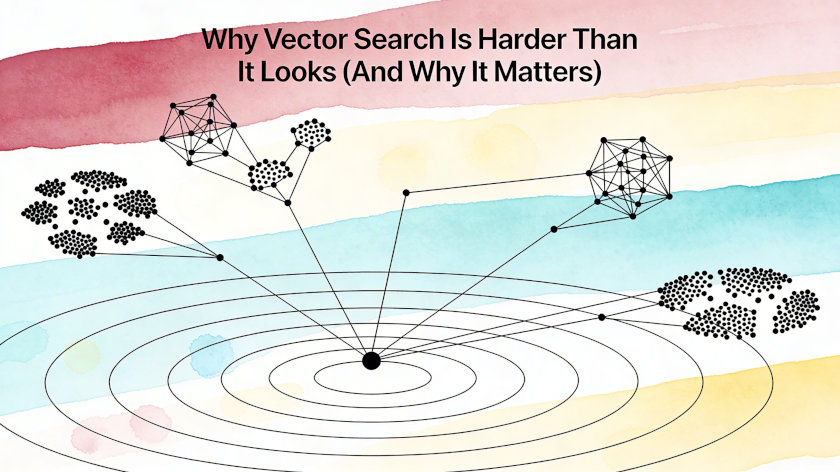
5.2. Clustered / inverted indexes (IVF and friends)
Goal: don’t compare a query to every vector.
High‑level idea:
- Cluster all vectors into groups (using something like k‑means).
- Each cluster has a centroid.
- Each document vector gets assigned to the nearest centroid.
- At query time:
- Find which centroids are close to the query.
- Search only in those clusters, not in the entire dataset.
This structure is often called an inverted file index for vectors (IVF).
Pros:
- Reduces the number of comparisons drastically.
- Can be combined with compression (quantization) inside clusters.
Cons:
- Very sensitive to how clustering is done and configured.
- If the query is assigned to “wrong” clusters, you miss good candidates.
In practice:
- Frequently used as a first pass to filter candidates.
- Followed by a more precise search among that smaller set.
5.3. HNSW: the “small‑world” graph
HNSW (Hierarchical Navigable Small World) is one of the most popular ANN indexes today.
Intuition:
- Treat vectors as nodes in a graph.
- Connect each node to some of its neighbors.
- Build multiple layers:
- Upper layers: fewer nodes, rough navigation.
- Lower layers: more nodes, fine‑grained search.
Search process:
- Start at some high‑level node.
- Move to neighbors that are closer to the query vector.
- Gradually descend through layers until you’re in the “neighborhood” of the best matches.
Pros:
- Very fast lookups.
- Widely supported in modern vector databases (Qdrant, Milvus, many Postgres extensions, etc.).
Cons:
- Index building is expensive on large datasets (tens of millions of vectors).
- Can consume a lot of RAM.
- Updating (adding lots of new data, re‑building) is non‑trivial.
- Behavior heavily depends on tuning parameters.
5.4. Disk‑optimized indexes (DiskANN and similar)
Once your dataset becomes huge, you can’t keep everything in RAM:
- Embeddings + index structures may take tens or hundreds of gigabytes.
- RAM is expensive; you might want to rely more on SSD.
Disk‑optimized indexes:
- Store most of the index on SSD.
- Keep only a compact “navigation” part in RAM.
- Are designed to reduce random disk reads and use sequential I/O as much as possible.
Pros:
- Can scale to massive collections.
- Better utilize cheaper SSD storage.
Cons:
- More complex to design and configure.
- Typically slower than pure in‑RAM indexes, but still much better than naive disk scans.
6. Memory pressure, quantization, and multi‑level indexing
Vector search isn’t just about algorithms; it’s also about resources.
You quickly run into questions like:
- How do I store 10–30 million vectors?
- How much memory does my index need?
- What if my infrastructure has limited RAM?
6.1. Quantization: compressing embeddings
Quantization is about:
- Storing vectors more compactly.
- Reducing precision or dimension while trying to keep distances meaningful.
Examples:
- Storing each dimension as 8‑bit instead of 32‑bit.
- Using matrix‑based methods to project vectors into a smaller space with low distortion.
Goal:
- Lose as little search quality as possible.
- Save a lot of memory and speed up distance computations.
A good quantization scheme:
- Might reduce memory usage several times.
- Maintains enough structure in the space to keep search useful.
6.2. Index on top of index
Sometimes you build multi‑level indexing:
1.First level:
- Cluster documents.
- Represent each cluster by an “average” embedding or another aggregate.
2.Second level:
- Build a fast index over these cluster embeddings.
3.Third level:
- Inside a selected cluster, build another index over the individual document embeddings.
Searching then becomes:
- Step 1: find the best clusters.
- Step 2: search inside those clusters.
Result:
- Fewer comparisons.
- Better use of memory and cache.
- More control over trade‑offs (speed vs. accuracy).
7. Vector databases: more than just indexes
Instead of writing all this infrastructure yourself, you usually use a vector database such as:
- Qdrant
- Milvus
- Weaviate
- Postgres + vector extensions
- and others
These systems provide:
- Storage for vectors and associated metadata (IDs, text, tags, timestamps).
- Multiple index types (flat, HNSW, IVF, disk‑based).
- Filters over metadata (e.g., “only documents in English from 2024”).
- Built‑in hybrid search (dense + sparse).
- Some form of re‑ranking and scoring utilities.
- Horizontal scaling, replication, durability, etc.
Example: a modern vector DB can:
- Store your embeddings.
- Let you query “top‑k similar items where
language = 'en'andtype = 'article'”. - Combine semantic similarity with BM25 keyword scoring.
- Re‑rank results to increase diversity or importance.
8. Re‑ranking: cleaning up the candidate list
Imagine your index returns the top‑100 candidate documents for a query.
This list is already decent, but still imperfect:
- Some items are near‑duplicates.
- Some are technically similar but not really what the user wants.
- Some are missing critical context.
Re‑ranking steps in to refine this list.
8.1. Ways to re‑rank
LLM as a judge
- Feed the query and candidate snippets into a language model.
- Ask it to score how relevant each candidate is.
- Sort by this score.
Specialized re‑ranker models
- Cross‑encoders or specific re‑rank models (like BGE‑based re‑rankers).
- Usually take (query, document) pairs and output a relevance score.
- Can be fine‑tuned on domain‑specific data.
Rule‑based or heuristic re‑ranking
- Boost items that are more recent.
- Down‑rank items from low‑trust sources.
- Prefer documents in the user’s native language, etc.
8.2. When re‑ranking is useful
Re‑ranking is especially helpful when:
- The dataset is large and diverse.
- The index returns a reasonably big candidate set (top‑50, top‑100).
- You care a lot about top‑3 / top‑5 quality from a user perspective.
You may skip heavy re‑ranking when:
- Your dataset is small and clean.
- Your embeddings and indexing already give reliably good top‑k.
- Latency budget is very tight.
9. Why “just add embeddings” is not enough
On social media, RAG and vector search often look like this:
- Take an LLM.
- Take any embedding model.
- Use any vector database.
- Call a “search” method and you’re done.
Reality in production is very different. Common pitfalls:
- Embedding model doesn’t fit the domain (e.g., general model in highly technical medicine).
- Documents are chunked poorly; chunks are too long, too short, or fragmented.
- Index type isn’t tuned or isn’t appropriate for dataset size and hardware.
- Memory usage explodes when the collection grows.
- There is no monitoring of search quality over time.
- No proper re‑ranking, so users get weird or irrelevant results in top‑k.
Real systems require:
- Careful choice and evaluation of embedding models.
- Decisions about chunk sizes and document segmentation.
- Selecting and tuning indexes (flat vs HNSW vs IVF vs disk‑based).
- Memory and storage planning, plus quantization strategies.
- Possibly hybrid dense + sparse setups.
- Re‑ranking (LLM‑based, model‑based, or rules).
- Continuous feedback loops and iteration.
10. What you should take away at 20
If you’re around 20 and want to go beyond “just calling an AI API”, here are the big ideas to internalize:
Embeddings are the bridge between meaning and math.
They let us treat semantic similarity as geometric proximity.
Vector search is an engineering discipline, not a black box.
It involves data structures, algorithms, memory management, and system design.
There is no single “best” index or database.
Every choice is a trade‑off between:
- Latency,
- Memory/disk usage,
- Accuracy,
- Complexity of implementation.
Hybrid approaches win in realistic domains.
Combining dense + sparse signals, multi‑level indexing, and re‑ranking consistently outperforms naive setups.
Domain and data shape the system.
The right choices for a casual Q&A bot about movies are very different from a search system for medical research papers or legal documents.
Published on 4/10/2026